PWM settings
Adding or editing waypoint, starting from the take-off point, activates the PWM settings button.

Clicking on it opens a settings dialog with the following options for sending the signal to the output (e.g. for moving a servo):
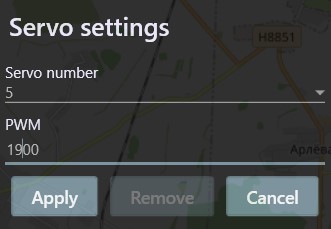 This means that upon reaching the edited point, servo drive number 5 will receive a pulse width modulation equal to 1900.
It can change the camera angle to a surtain degrees for example or drop a payload.
This means that upon reaching the edited point, servo drive number 5 will receive a pulse width modulation equal to 1900.
It can change the camera angle to a surtain degrees for example or drop a payload.